Why Use an Anti-Detect Browser? Guide
Introduction
In a digital world where websites track user behavior closely, managing multiple accounts or maintaining privacy can be challenging. Standard browsers often reveal unique device and configuration details that make identification easy.
An anti-detect browser addresses these challenges by allowing users to create separate, less traceable browsing environments. Understanding why to use one helps individuals and businesses operate more effectively online.
This guide covers the basics, workings, benefits, and considerations of anti-detect browsers. Readers will gain practical knowledge to decide if this tool fits their needs and how to use it responsibly.
Quick Answer
An anti-detect browser modifies or spoofs browser fingerprints, user agents, and other signals to make each session appear unique and less trackable. It helps users manage multiple accounts without triggering platform restrictions or detection systems.
What Is an Anti-Detect Browser?
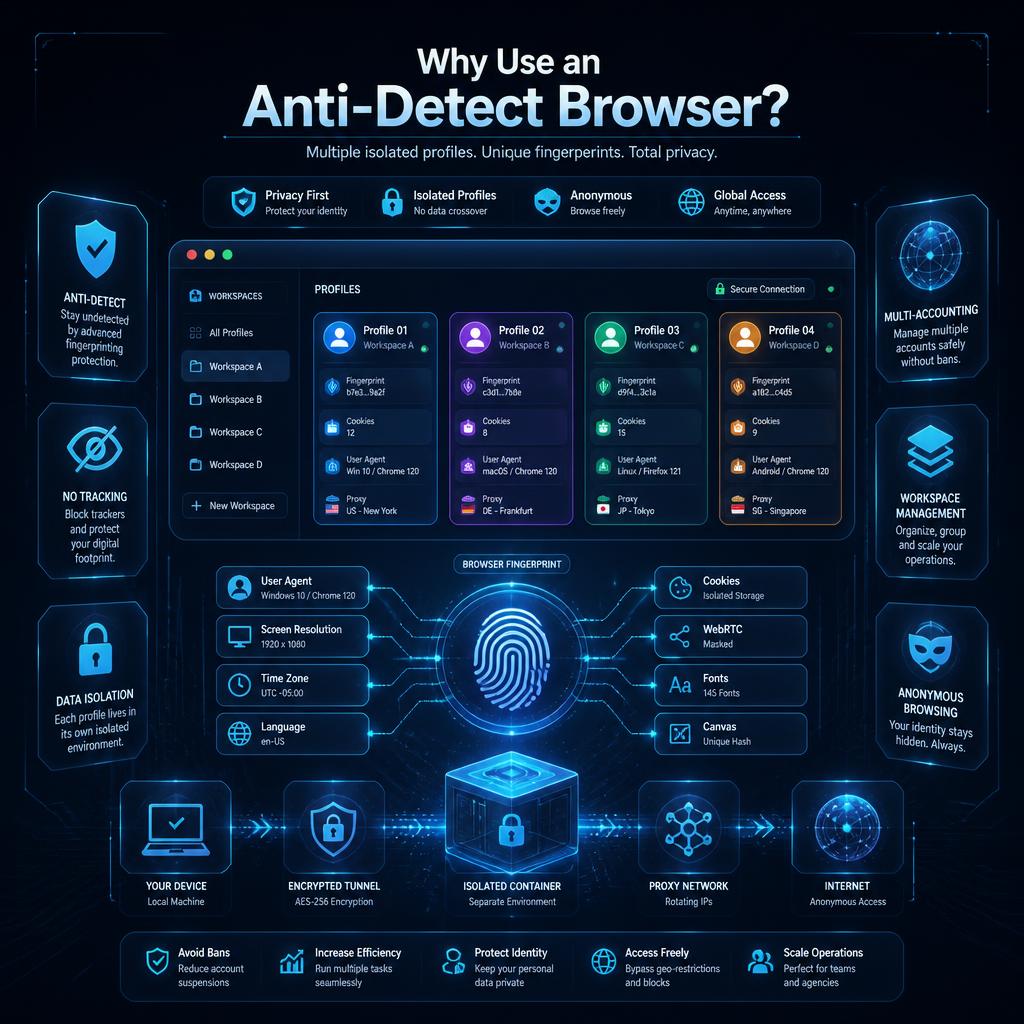
An anti-detect browser is specialized software designed to prevent websites from identifying and linking different browsing sessions. Unlike regular browsers, it allows users to create multiple independent profiles where each one presents a distinct digital fingerprint.
These fingerprints include details like screen resolution, installed fonts, hardware information, and canvas rendering patterns. By randomizing or customizing these elements, the browser reduces the ability of tracking systems to connect activities across profiles.
Why Is an Anti-Detect Browser Important?
Websites and platforms use sophisticated tracking to enforce rules against multiple accounts or suspicious behavior. For legitimate users handling several profiles for business, testing, or personal reasons, standard tools often lead to blocks or bans.
Anti-detect browsers provide a way to maintain separate identities online while minimizing detection risks. They support privacy-focused activities and help businesses scale operations across platforms without unnecessary interruptions.
In an environment of increasing data collection, such tools offer practical control over how your online presence appears to services.
How Does an Anti-Detect Browser Work?
The process generally follows these steps:
- Profile Creation: Set up a new browsing profile with customized parameters.
- Fingerprint Spoofing: The browser automatically or manually adjusts characteristics like WebGL data, canvas output, and audio context to appear unique.
- Proxy Integration: Often paired with different IP addresses for each profile to enhance separation.
- Session Isolation: Cookies, cache, and local storage remain separate between profiles.
- User Agent Modification: Changes the browser identification string to match different device types.
- Ongoing Management: Users switch between profiles easily while the tool maintains consistent spoofing.
This layered approach creates the illusion of completely different users to external observers.
Types of Anti-Detect Browsers
Options range from free open-source tools to advanced commercial solutions. Some focus on basic fingerprint changes while others include built-in proxy managers, automation features, or team collaboration tools. Cloud-based versions offer accessibility across devices, whereas desktop applications provide deeper system integration.
Key Features
- Fingerprint Randomization: Unique signatures for each profile.
- Cookie and Storage Isolation: Complete separation of data.
- Proxy Support: Easy integration with various proxy types.
- User Agent Switching: Mimics different browsers and devices.
- Automation Capabilities: Support for scripts and extensions in isolated environments.
- Team Management: Options for sharing or collaborating on profiles.
- Security Enhancements: Additional protections against common tracking methods.
Advantages
- Better success rates when operating multiple accounts.
- Reduced risk of cross-profile linking by platforms.
- Enhanced privacy through minimized data leakage.
- Efficient workflow for digital marketing or research tasks.
- Customizable environments tailored to specific needs.
- Time savings compared to managing separate physical devices.
- Greater control over online identity presentation.
Limitations
- May not fool every advanced detection system.
- Learning curve for effective configuration.
- Potential performance overhead with many active profiles.
- Quality varies significantly between different tools.
- Legal and terms-of-service considerations depending on usage.
- Still requires good complementary practices like unique proxies.
- Possible compatibility issues with certain websites.
Common Use Cases
- Social Media Management: Running multiple profiles for marketing or community building.
- E-commerce Operations: Handling various seller or buyer accounts.
- Web Scraping and Research: Collecting public data without blocks.
- Ad Verification: Checking campaigns from different perspectives.
- Account Testing: Developers evaluating platform changes safely.
- Freelance Work: Managing client-specific environments.
- Privacy Protection: General users seeking stronger anonymity.
Best Practices
Pair the browser with high-quality proxies matched to each profile's settings. Keep profiles logically organized and documented. Use strong, unique passwords and enable additional security layers where available. Regularly update the anti-detect software for latest spoofing techniques. Test configurations on target platforms before full deployment. Avoid mixing sensitive activities in the same profile. Monitor for any unusual platform responses and adjust parameters accordingly.
Common Mistakes
- Using poor quality or free proxies that get flagged easily.
- Creating too many similar fingerprints without enough variation.
- Neglecting to clear or isolate data properly between sessions.
- Over-relying on the tool without other security measures.
- Ignoring platform terms of service regarding multiple accounts.
- Failing to update spoofing parameters regularly.
- Sharing profiles insecurely in team environments.
Comparison
Anti-detect browsers are frequently compared to regular browsers enhanced with VPNs or proxies.
AspectAnti-Detect BrowserRegular Browser + VPN/ProxyIncognito ModeFingerprint Protection | Strong spoofing | Limited | None
Session Isolation | Full per profile | Manual | Temporary only
Multi-Account Support | Excellent | Moderate | Poor
Ease for Beginners | Moderate learning curve | Simple | Very simple
Performance Impact | Can be higher with many profiles | Lower | Minimal
Primary Strength | Identity separation | IP hiding | Local data clearing
Anti-detect browsers excel specifically in scenarios requiring multiple distinct identities.
Frequently Asked Questions
What exactly is browser fingerprinting?
It is the collection of various technical details about your device and browser that create a unique identifier even without cookies.
Do anti-detect browsers work with all websites?
Most perform well on major platforms, but highly protected sites may still detect advanced setups.
Is using an anti-detect browser legal?
Yes for legitimate purposes, but always respect individual platform rules and local laws.
How does it differ from using a VPN?
VPNs primarily hide IP addresses while anti-detect browsers focus on browser-level identification signals.
Can beginners use these browsers effectively?
Yes, many offer user-friendly interfaces, though starting with basic configurations helps build familiarity.
Do they slow down browsing speed?
Slight impact is possible, especially with resource-intensive spoofing, but quality tools minimize this.
What should I look for when choosing one?
Strong fingerprint randomization, reliable proxy integration, regular updates, and good customer support.
Are there free anti-detect browsers?
Basic options exist, but paid versions usually provide better results and security features.
How do I get started with my first profile?
Install the software, create a new profile, configure proxy and fingerprint settings, then test on a target site.
Can these browsers be used on mobile devices?
Some solutions offer mobile support or companion apps, though desktop remains primary for most users.
Key Takeaways
- Anti-detect browsers provide specialized protection against tracking and detection.
- They work best when combined with appropriate proxies and careful management.
- Understanding fingerprinting helps appreciate their value.
- Proper configuration is key to successful multi-account operations.
- Always prioritize compliance with platform policies.
- Regular updates and testing maintain effectiveness over time.
Conclusion
Anti-detect browsers offer valuable capabilities for users who need to maintain separate online identities or enhance privacy. By addressing the specific challenges of browser tracking, they enable more flexible and secure digital workflows. Thoughtful implementation alongside other good practices leads to reliable results across various online activities.
Related Articles
Browser Security Best Practices
How to Manage Multiple Social Accounts
Understanding Digital Fingerprints
Proxy and VPN Guide
Secure Account Management Tips
Related Product Pages
Browser Security Tools
Residential Proxies
VPN Solutions
Related Posts
How to Secure Your Online Accounts in 2025
Why Account Security Matters In today’s digital world, online accounts contain personal information, financial data, and communication history. Whether you manage social media accounts, business accounts, or personal profiles, keeping them secure is essential. A strong and secure account protects you from hacking, phishing, data loss, and unauthorized access.
How to Use Reddit Safely Without Getting Banned
Learn how to use Reddit safely and avoid account bans. Follow simple rules and best practices to keep your account secure.
How to Check if Your Email Has Been Hacked (Step-by-Step Guide 2026)
Worried your email might be hacked? Learn how to check if your email has been compromised and what to do immediately to secure your account in 2026.