What Is a Proxy Server? Complete Beginner Guide
Introduction
In today's connected world, protecting your online identity and accessing information efficiently matters more than ever. Whether you're browsing from home, managing multiple accounts, or handling sensitive tasks, understanding tools that enhance your internet experience is key.
A proxy server is one such fundamental technology that sits between your device and the websites you visit. It plays a vital role in privacy, performance, and security for individuals and businesses alike.
In this guide, you'll learn exactly what a proxy server is, how it functions, its different types, advantages, limitations, and practical ways to use it. By the end, you'll have a clear picture of when and why to consider using one.
Quick Answer
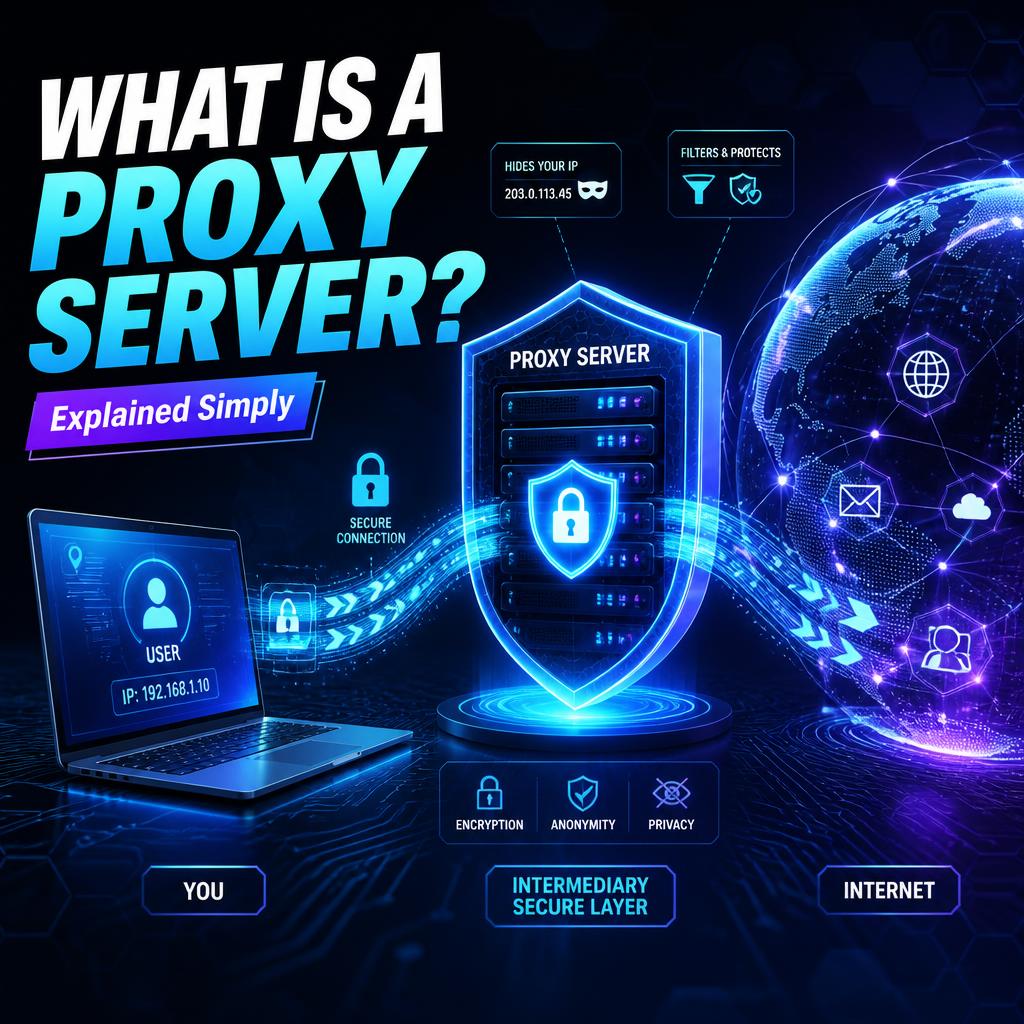
A proxy server is an intermediary computer that handles requests between your device and the internet. It forwards your requests to websites, receives responses, and sends them back to you, often hiding your real IP address in the process. This setup improves privacy, bypasses restrictions, and can enhance speed through caching.
What Is a Proxy Server?
A proxy server is a dedicated computer or software system that acts as a gateway between your device (like a laptop or smartphone) and the broader internet. Instead of connecting directly to a website, your request first goes through the proxy server.
Think of it like a middleman at a store. You tell the middleman what you want, he gets it for you, and brings it back. The store doesn't see you directly — only the middleman.
When you use a proxy, the website you visit sees the proxy's IP address rather than yours. This basic mechanism enables many practical benefits, from anonymity to content filtering.
Proxies operate at the application level or network level, depending on the type, and have been part of internet infrastructure since the early days of web browsing.
Why Is a Proxy Server Important?
Proxy servers address several core challenges in online activity. They help maintain privacy by masking your real location and identity. In regions with content restrictions, they allow access to blocked sites. Businesses use them to control employee internet access and protect internal networks.
They also contribute to better performance by caching frequently requested content, reducing bandwidth usage and load times. For security-conscious users, certain proxies add layers of protection against basic tracking.
As data privacy concerns grow and remote work becomes standard, proxies remain relevant tools for both casual users and professionals managing digital workflows.
How Does a Proxy Server Work?
The process follows a straightforward sequence:
- Request Initiation: Your device sends a request to access a website or online resource, but routes it first to the proxy server instead of directly to the destination.
- Forwarding: The proxy server evaluates the request based on its rules (such as allowed sites or authentication). It then forwards the request to the target website using its own IP address.
- Response Handling: The website responds to the proxy server. The proxy may cache the response for future use, modify it if needed, or simply pass it back to your device.
- Delivery: Your device receives the content as if it came directly from the site, though the actual connection path went through the intermediary.
This intermediary step breaks the direct link between you and the destination server. Advanced proxies can also handle encryption, logging, or filtering during this flow.
Types of Proxy Servers
Proxy servers come in various forms, each suited to specific needs:
- Forward Proxies: These handle outgoing requests from internal users to the internet. Common in corporate environments for monitoring and filtering.
- Reverse Proxies: Positioned in front of web servers, they manage incoming traffic, balance loads, and protect backend servers from direct exposure.
- Residential Proxies: Use IP addresses from real residential internet connections, making them appear more legitimate for tasks like data collection.
- Datacenter Proxies: Hosted in data centers with high-speed connections, ideal for performance-heavy tasks but easier to detect.
- Mobile Proxies: Route through mobile device IPs, useful for app testing or location-specific access.
- SOCKS5 Proxies: Support various protocols beyond HTTP, offering greater flexibility for apps like torrent clients or gaming.
- Transparent Proxies: Don't hide the user's IP but focus on caching or filtering without user configuration.
- Anonymous and Elite Proxies: Vary in how much they reveal about the original user.
Choosing the right type depends on your goals, whether it's speed, anonymity, or compatibility.
Key Features
- IP Masking: Hides your real IP address from visited sites.
- Caching: Stores copies of web pages to serve them faster on repeat visits.
- Content Filtering: Blocks or allows specific sites based on rules.
- Access Control: Enforces authentication and usage policies.
- Load Balancing: Distributes traffic across multiple servers (especially reverse proxies).
- Protocol Support: Handles HTTP, HTTPS, SOCKS, and more depending on configuration.
- Logging and Monitoring: Records activity for analysis or compliance.
Advantages
- Enhanced privacy through IP hiding.
- Ability to bypass geo-restrictions and censorship.
- Improved browsing speed via caching.
- Cost-effective solution for basic anonymity needs.
- Centralized control for network administrators.
- Flexible for specific applications without affecting the entire system.
- Helps in web scraping and testing by rotating IPs.
Limitations
- No inherent encryption, leaving data vulnerable to interception.
- Potential slowdowns if the proxy is overloaded or distant.
- Free proxies may log activity or inject ads.
- Some sites actively block known proxy IPs.
- Limited to specific applications unless configured system-wide.
- Quality varies widely between providers.
- May complicate troubleshooting connection issues.
Common Use Cases
- Privacy Protection: Individuals use proxies to prevent websites from tracking their location and habits.
- Bypassing Restrictions: Accessing region-locked content like streaming services or news sites.
- Web Scraping: Businesses gather public data without triggering blocks by rotating proxy IPs.
- Corporate Security: Companies filter employee web access and hide internal network details.
- Market Research: Analyzing competitor sites from different geographic perspectives.
- Ad Verification: Checking how ads appear in various locations.
- Gaming and Streaming: Reducing lag or accessing servers in other regions.
Best Practices
Select reputable proxy providers with clear privacy policies. Use HTTPS proxies when possible for better security. Combine proxies with other tools like antivirus for layered protection. Regularly rotate IPs for tasks requiring anonymity. Test proxies with your specific applications first. Monitor usage to avoid performance bottlenecks. Configure browser or system settings carefully to prevent leaks.
For advanced needs, consider dedicated solutions rather than free public proxies.
Common Mistakes
- Relying solely on free proxies, which often compromise security or speed.
- Forgetting to check for IP leaks that expose your real address.
- Using the same proxy for all activities, increasing detection risk.
- Ignoring terms of service on target websites.
- Overlooking the difference between proxy types and their suitability.
- Failing to update configurations when switching networks.
- Assuming proxies provide full security equivalent to encrypted solutions.
Comparison
Proxies are often compared to VPNs, as both route traffic through intermediaries but differ significantly in scope and security.
AspectProxy ServerVPNEncryption | Usually none or limited | Full traffic encryption
Scope | Often application-specific | System-wide protection
Speed | Generally faster | Slightly slower due to encryption
Privacy Level | Hides IP, basic anonymity | Stronger privacy with encryption
Use Case Focus | Specific tasks like scraping | General security and remote access
Setup Complexity | Varies by type | Usually simple app-based
Cost | Can be cheaper for basic use | Subscription-based for quality service
Proxies excel in targeted, lightweight scenarios while VPNs provide broader security. Many users combine both depending on the task.
Frequently Asked Questions
What is the main purpose of a proxy server?
It acts as an intermediary to hide your IP address, filter content, and improve performance.
Are proxy servers legal to use?
Yes, in most cases, though using them to violate laws or terms of service can have consequences.
Do proxies slow down internet speed?
They can, especially distant or overloaded ones, but quality proxies with caching may actually speed things up.
Can a proxy server be hacked?
Like any server, poorly secured proxies carry risks. Choose trusted providers.
What's the difference between HTTP and SOCKS proxies?
HTTP proxies handle web traffic while SOCKS supports more protocols including UDP for broader applications.
How do I set up a proxy server?
Configuration varies by device and browser — usually through network settings or extensions.
Are residential proxies better than datacenter ones?
Residential proxies appear more legitimate but datacenter options often provide better speed.
Do I need a proxy for everyday browsing?
Not necessarily, but they help with privacy or accessing restricted content.
Can proxies hide all my internet activity?
No, they typically affect configured applications only and don't encrypt data.
How are proxies used in business?
For content filtering, load balancing, security, and market intelligence gathering.
Key Takeaways
- Proxy servers serve as intermediaries that enhance privacy and access.
- Different types suit various needs from speed to anonymity.
- They offer advantages in performance and bypassing restrictions but lack full encryption.
- Proper selection and configuration are essential for effective use.
- Understand limitations compared to alternatives like VPNs.
- Always prioritize reputable sources for better reliability and safety.
Conclusion
Proxy servers remain a practical tool in the digital landscape, offering flexibility for privacy, access, and efficiency. By grasping their mechanics and appropriate applications, you can make informed decisions about incorporating them into your online routines. Whether for personal use or professional tasks, they provide valuable options when used thoughtfully alongside other security measures.
Related Articles
What Are Residential Proxies?
How to Choose the Right Proxy Type
Understanding SOCKS5 Proxies
VPN vs Proxy Explained
Best Practices for Online Privacy
Related Product Pages
Buy Residential Proxies
Premium SOCKS5 Proxies
Mobile Proxy Solutions
Related Posts
How to Secure Your Online Accounts in 2025
Why Account Security Matters In today’s digital world, online accounts contain personal information, financial data, and communication history. Whether you manage social media accounts, business accounts, or personal profiles, keeping them secure is essential. A strong and secure account protects you from hacking, phishing, data loss, and unauthorized access.
How to Use Reddit Safely Without Getting Banned
Learn how to use Reddit safely and avoid account bans. Follow simple rules and best practices to keep your account secure.
How to Check if Your Email Has Been Hacked (Step-by-Step Guide 2026)
Worried your email might be hacked? Learn how to check if your email has been compromised and what to do immediately to secure your account in 2026.